SFF GPU Clearance Checker
Compare exact card dimensions across the recorded case configurations. Cable clearance needs its own allowance; cooling interference requires a separate check.
Exact card thickness in mm (measure the card, do not convert from slot count).
Additional space above the card for this exact cable arrangement. Use the manufacturer’s guidance; no default is assumed.
Radiators and fans may reduce usable GPU clearance. This checker does not model radiator interference yet — use the manufacturer’s configuration table to confirm a water-cooled build.
Quick Summary · TL;DR
Compare exact card dimensions with each recorded case configuration. Cable clearance is a separate, conditional estimate; missing measurements stay unverified. Radiator interference and airflow require additional checks.
Why length alone isn’t enough
Length, height and thickness each have independent limits. This checker uses the recorded case layouts and published height bands. Cable clearance needs an exact-cable allowance; it does not assume a universal bend distance. Radiator interference and airflow are not modelled.
Always verify: case limits are manufacturer-stated, but graphics-card dimensions differ between AIB models. Confirm your exact card’s length, height and slot width before purchasing.
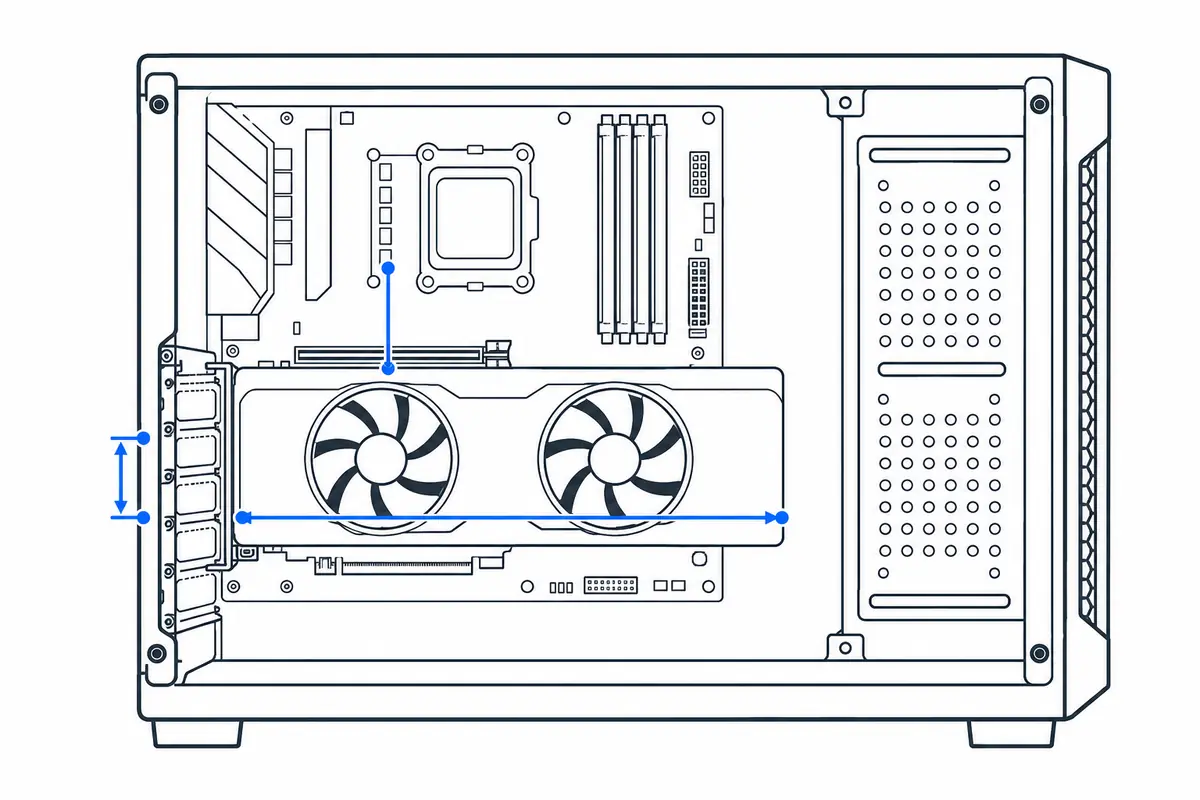
How to measure GPU clearance in an SFF case
Small-form-factor fit depends on three dimensions plus the space taken by radiators, fans, riser layout and power cables. A card can pass the published length limit and still fail on thickness or connector clearance.
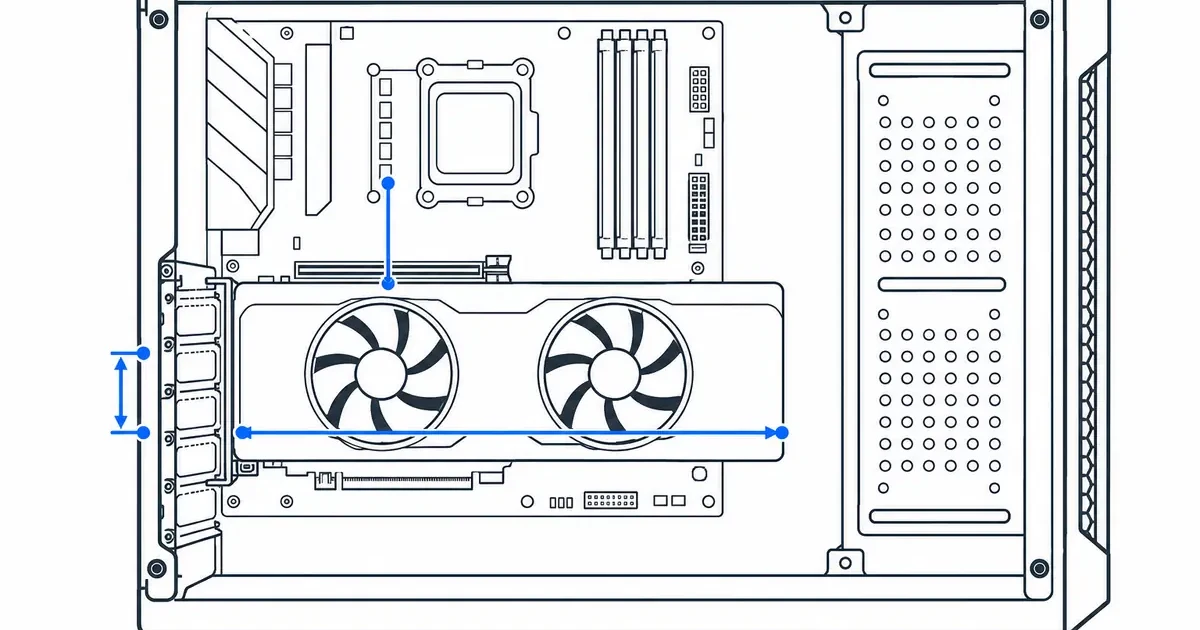
Step by step
- Select the exact graphics card model or enter its manufacturer dimensions, not only the GPU chip name.
- Select the case layout and note whether front fans, a radiator, drive cage or vertical mount changes the available space.
- Compare length, card height and slot thickness; all three must pass.
- Reserve connector and cable-bend clearance, especially beside the side panel on high-power cards.
How to read the result
Pass means the listed outer dimensions fit inside the stored case limits. Borderline means tolerances are small enough that cable routing or optional hardware could change the answer. Unknown dimensions must be measured manually.
Common mistakes to avoid
- Using reference-card dimensions for a larger factory-overclocked partner card.
- Counting bracket slots while ignoring a cooler that extends beyond the final slot.
- Forgetting that a front radiator and fans reduce usable GPU length.
- Pressing a power cable sharply against the side panel or bending it immediately at the connector.
Verify before you buy or change settings
Open the case compatibility list and the exact graphics-card dimensional drawing. Check forum build photos only as supporting evidence because revisions can change. Leave practical tolerance for manufacturing variation, riser movement and airflow; a theoretical zero-millimetre fit is not a comfortable build.
Calculator logic and this guide were reviewed October 26, 2026. See the methodology and limitations.
Frequently asked questions
Why does my GPU need extra clearance for the power cable?
The plug and cable need space without pressure from the side panel. Use guidance for the exact cable, connector orientation and card. Leave the allowance blank when it is unknown; a connector name alone cannot supply a reliable distance.
What is the most common reason a GPU won't fit an SFF case?
There is no single limiting dimension for every case. Check thickness, height, usable length and connector space independently in your actual layout.
Are these clearance numbers exact for every card?
They use manufacturer-stated case limits, but graphics-card dimensions vary by AIB model, so always confirm the exact length, height and slot width of your specific card before buying.
Building small? Size the power supply with the PSU Calculator (SFX units) and browse all tools on the tools page.
SEPARATE CHECK / COOLING LAYOUT
Does the front-cooling layout leave enough GPU length?
This worksheet only compares length. Use a published configuration limit or a measured intrusion into the GPU’s actual path. It does not select a case, approve a radiator mount, or change the case-database result above.
Same parts, two ways to describe the space
Illustrative measurements, not a product specification: a 340mm bare path minus 55mm of confirmed additional cooling intrusion leaves 285mm. A 300mm card exceeds it by 15mm. If the manual already states a 285mm limit with that same cooling fitted, enter 285mm in the configured mode and subtract nothing else. Both answers must be −15mm.
With a 280mm card the arithmetic leaves 5mm. That is not a safe-installation allowance: still check mounting movement, height, thickness, connector direction, cable instructions, cooler tubes and access. Zero remaining length needs special care; do not round it into a comfortable fit.
What should you do with the result?
- Negative margin: compare a shorter exact GPU or a manufacturer-supported cooling position. A longer case is one option, not the automatic first purchase.
- Non-negative margin: continue the independent height, thickness, cable and installation checks. This worksheet cannot approve the complete build.
- Missing layout information: ask the case manufacturer which limit includes your fan/radiator arrangement before buying.
For an exact cooling-stack example, see B4 mATX + Liquid Freezer III 360. For adjustable layouts, see Terra GPU versus CPU-cooler clearance.
Worksheet arithmetic and limitations reviewed 26 October 2026. Case database source dates above remain separate; this is not a re-verification of every hardware record.