FPS & Frame-time Calculator
Convert FPS to frame-time (and back), and see which refresh rates your frame rate can saturate.
Quick Summary · TL;DR
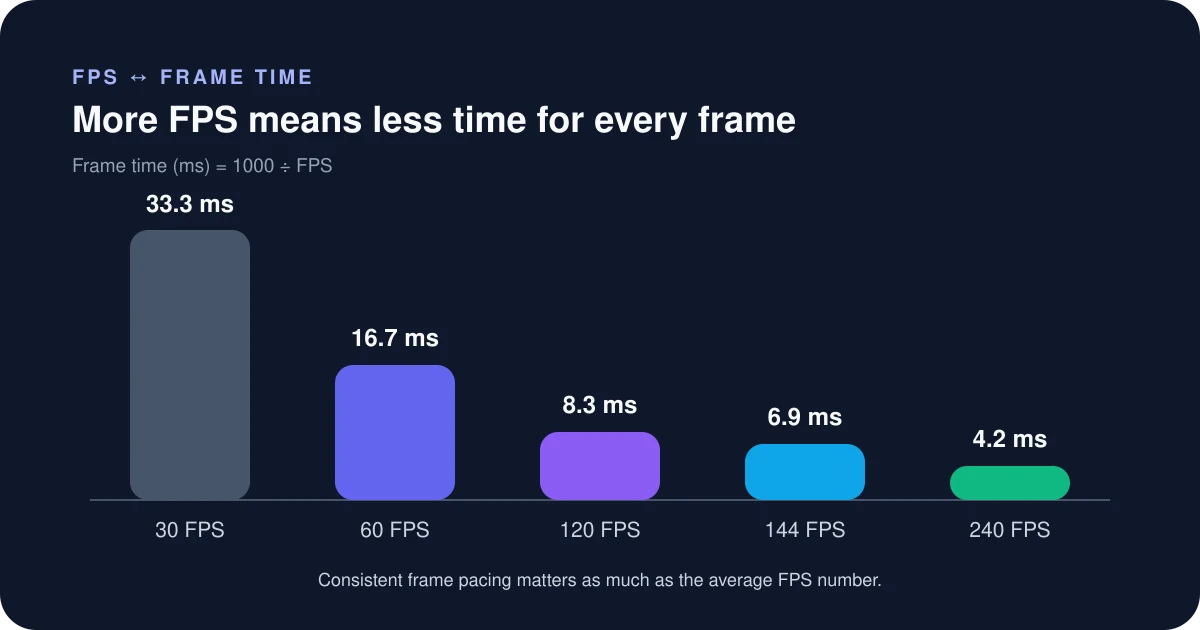
Frame-time (ms) = 1000 ÷ FPS. To fully use a monitor you need FPS at least equal to its refresh rate (144 FPS for 144Hz). Smoothness depends on consistent frame-times, not just the average.
How to read FPS and frame-time
Frames per second is a rate; frame-time is the duration of each frame. Converting between them makes refresh-rate targets easier to understand and shows why a small millisecond spike can feel large at high frame rates.
Step by step
- Choose whether you know FPS or milliseconds and enter the measured or target value.
- Compare the converted result with the monitor refresh interval.
- Use average FPS for throughput, then inspect 1% lows and a frame-time graph for consistency.
- Set a practical cap when it improves pacing, thermals or variable-refresh behaviour.
How to read the result
A 144 Hz monitor can refresh every 6.94 ms, but it does not guarantee the game produces a new frame that often. Likewise, FPS above refresh rate can reduce input age even when not every frame is shown, with possible tearing unless synchronisation is configured.
Common mistakes to avoid
- Assuming 120 FPS is exactly twice as responsive as 60 FPS in every part of the system.
- Judging smoothness by average FPS while ignoring long frame-time spikes.
- Confusing monitor response-time marketing with whole-frame render time.
- Mixing benchmark results captured with different caps, upscalers, frame generation or CPU limits.
Verify before you buy or change settings
Capture a representative play session with a consistent benchmark tool. Compare average, 1% low and the frame-time plot, and note whether frame generation is enabled. Frame generation can raise displayed FPS without reducing all input and simulation latency in the same proportion.
Calculator logic and this guide were reviewed July 19, 2026. See the methodology and limitations.
Frequently asked questions
How do I convert FPS to frame-time?
Frame-time in milliseconds equals 1000 divided by your FPS. So 144 FPS is about 6.94ms per frame, and 60 FPS is 16.67ms.
What FPS do I need for a 144Hz monitor?
You need at least 144 FPS to fully use a 144Hz panel; below that the monitor simply displays fewer unique frames. Higher and more stable is better, which is why competitive players target well above their refresh rate.
Why do pros care about frame-time, not just average FPS?
Because smoothness depends on consistent frame-times; a high average FPS with occasional long frames still stutters. Watching frame-time (and 1% lows) reveals hitching that an average hides.
Not hitting your refresh rate? Check whether your CPU or GPU is the limit with the Bottleneck Estimator.