Gaming PC Build Cost Calculator
The tower is only half the bill. Add Windows, a monitor and peripherals to see the true total before you buy.
Quick Summary · TL;DR
True cost = tower + Windows + monitor + peripherals + extras. These hidden items typically add 20-40% on top of the build price, so a $800 tower often becomes $1,100+ in reality. Budget for them from the start.
The hidden costs of a gaming PC
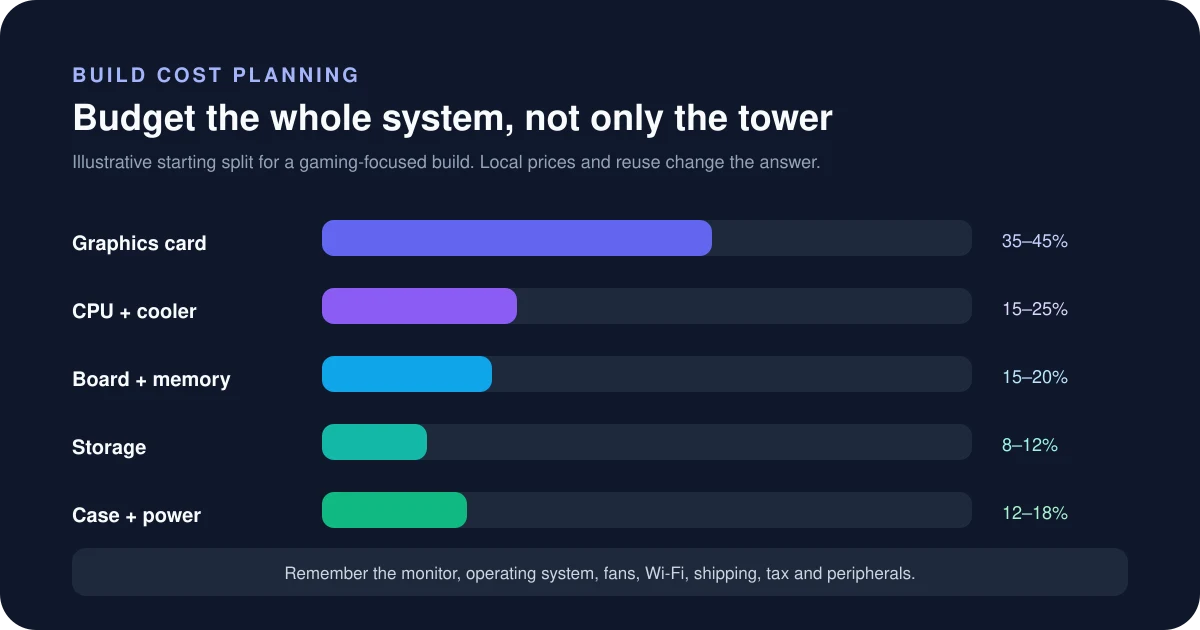
The single most common mistake beginners make is budgeting only for the tower. A complete setup also needs an operating system, a screen and input devices — and those add up fast. Planning for them upfront stops the project from quietly running over budget.
| Hidden item | Typical cost |
|---|---|
| Windows licence (OEM / retail) | $30 - $139 |
| Monitor (1080p - 4K high refresh) | $150 - $520 |
| Mouse + keyboard | $45 - $190 |
| Headset / audio | ~$65 |
| Extras (fans, paste, WiFi) | ~$40 |
Prices are 2026 estimates and vary by brand and region.
How to estimate the real cost of a PC build
The headline component subtotal is rarely the amount paid at checkout. A realistic build budget includes tax, shipping, operating system, missing cooling, peripherals and a small contingency for price movement or a replacement part.
Step by step
- Enter current prices for the exact parts in your cart rather than remembered launch prices.
- Add local tax and shipping using the rates and fees that apply to your destination.
- Include the operating system, cooler, fans, adapters, tools and peripherals only when you actually need them.
- Keep a contingency and compare the final total with the maximum amount you can pay today.
How to read the result
The calculator separates the component subtotal from additional costs so you can see where the budget moves. It does not fetch live retailer prices or predict future discounts, import duties, finance charges or currency conversion fees.
Common mistakes to avoid
- Mixing prices from different countries or tax-inclusive and tax-exclusive stores.
- Forgetting that some CPUs do not include a cooler and some cases include few or no fans.
- Using a temporary coupon or rebate without checking its conditions and expiry.
- Leaving no budget for returns, a BIOS update service or a replacement cable.
Verify before you buy or change settings
Recheck the final cart immediately before ordering, including seller identity, shipping date and return policy. Marketplace prices change quickly. SpecsCalc purchase links may be affiliate links, but displayed planning values are not live Amazon prices and should never be treated as current quotes.
Calculator logic and this guide were reviewed July 19, 2026. See the methodology and limitations.
Frequently asked questions
How much does a gaming PC really cost in 2026?
Beyond the tower, budget for a Windows license, a monitor, and peripherals — these hidden extras often add 20-40% on top of the build price. A $800 tower frequently becomes a $1,100+ total once everything is included.
Do I need to buy Windows separately?
Usually yes, unless you reuse an existing license or run Linux. A cheap OEM key costs around $30, while a retail Windows 11 Home licence is about $139.
What hidden costs do beginners forget?
The big ones are the operating system, a monitor, and a mouse and keyboard — plus small extras like extra fans, thermal paste or a WiFi card. This calculator adds them all so there are no surprises.
Pick a balanced tower first in the Auto PC Builder, then come back to total the full setup.