Skip to content
SpecsCalc

Is the RTX 5080 Good for 4K & 1440p Gaming?

· Methodology

16GB VRAM · RTX 50 · performance index 86/100

Quick Summary · TL;DR

The RTX 5080 is best suited to 4K gaming. See the verdict for each resolution below — ratings factor in both raw performance and its 16GB VRAM.

1080p (FHD)

Excellent

Easily maxes 1080p with very high frame rates — ideal for high-refresh esports.

1440p (QHD)

Excellent

High-refresh 1440p Ultra with ease.

4K (UHD)

Excellent

Native 4K at 60-120 FPS in most titles.

What resolution is the RTX 5080 best for?

Based on its performance tier and 16GB of VRAM, the RTX 5080 is happiest at 4K. Upscaling (DLSS, FSR or XeSS) can push it one tier higher in supported games by lowering the internal render resolution. Remember a bottleneck cuts both ways — pair it with a CPU that can keep up using the Bottleneck Estimator.

More on this card: recommended PSU · SFF fit.

How close the RTX 5080 is to each resolution rating

The RTX 5080 scores 86 on our index and clears every rating line we use, including the 4K Excellent line at 86 by 0 points. Resolution is not the limit for this card; frame-rate targets and the CPU are.

ResolutionOur ratingLine it clearsNext rating needs
1080pExcellentExcellent line at 40 (+46)Top rating reached
1440pExcellentExcellent line at 76 (+10)Top rating reached
4KExcellentExcellent line at 86 (exactly on it)Top rating reached

Rating lines are the index thresholds behind every resolution verdict on our GPU pages (1440p: Playable 38, Good 48, Great 60, Excellent 76; 4K: Playable 50, Good 64, Great 76, Excellent 86). The index is an editorial tier summary on a 0–100 scale with the RTX 5090 at 100 — not a frame-rate measurement. See the methodology.

Where the RTX 5080 sits among the 34 cards we track

It ranks 3rd of the 34 cards we track. The next card up is the RTX 4090 (90) and the next one down is the RTX 4080 Super (83). With 16GB it shares its memory size with 7 other cards on the list. It is one of 11 cards here with 16GB or more, so texture settings are unlikely to be what holds it back. Per 100W of reference board power (360W) it delivers 23.9 index points, 12th of 33 cards with a reviewed power figure.

Buying the RTX 5080 in a sale? What one step up or down changes

The RTX 5080 is a current-generation card, so the useful comparison is with its neighbours on the shelf rather than with an upgrade. The table lists the nearest current cards above and below it on our index, with the maker's PSU guidance for each — the number that decides whether a discounted step up also means a new power supply.

CardIndexVRAMBoard powerMaker PSU guidance1440p / 4K
RTX 5080 (this card)8616GB360W850WExcellent / Excellent
RX 9070 XT78 (−8)16GB304W750WExcellent / Great
RTX 5090100 (+14)32GB575W1000WExcellent / Excellent

RX 9070 XT: −8 index points, same memory size. Its maker guidance (750W) is lower than the 850W listed for the RTX 5080. Board power falls by 56W. Power input: 2 × PCIe 8-pin.

RTX 5090: +14 index points, 16GB more memory. Its maker lists a 1000W supply, 150W above the 850W listed for the RTX 5080, so check the label on your current unit first. Board power rises by 215W. Power input: 4 × PCIe 8-pin through the supplied adapter, or a ≥600W PCIe Gen 5 cable.

Sources & verification

Resolution guidance is a directional tier recommendation, not a guaranteed frame-rate benchmark; results vary by game, settings, drivers and upscaling. Last reviewed September 19, 2026.

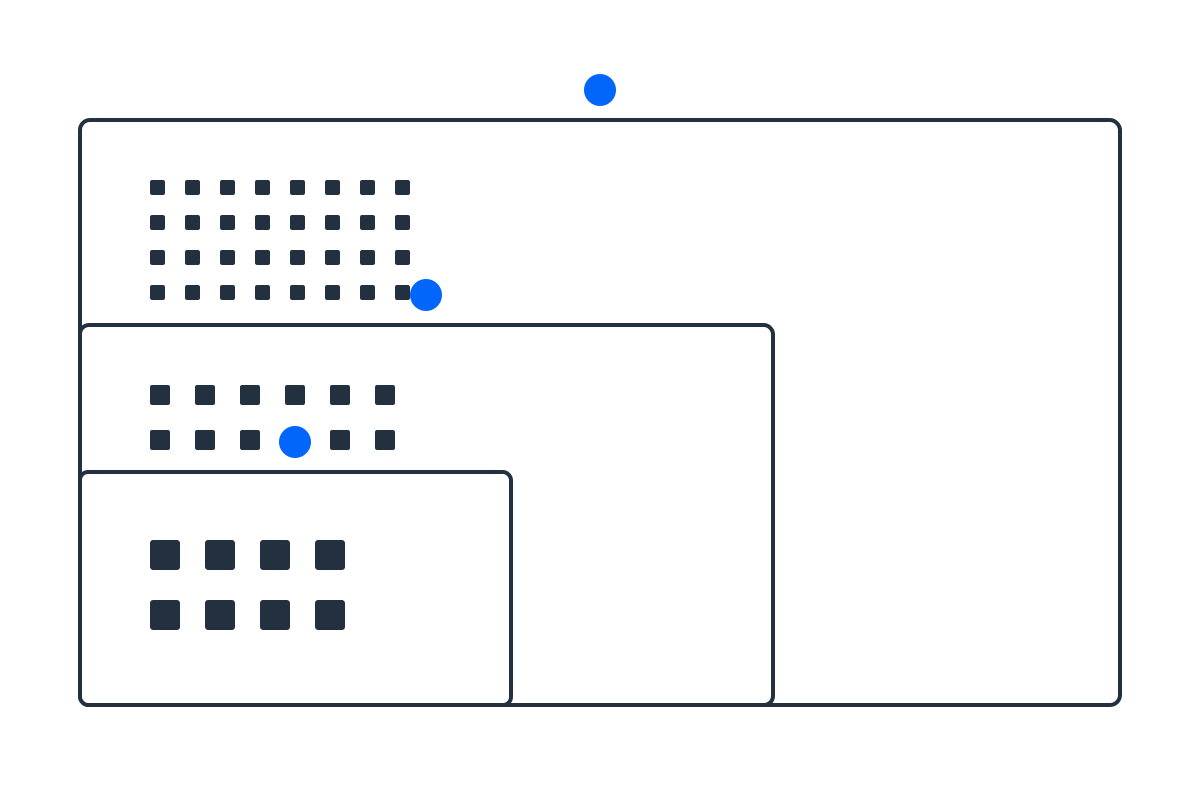
Nested 16:9 frames showing 1080p, 1440p and 4K pixel counts to scale
Why the same card feels slower at higher resolutions: each step up multiplies the pixels it has to draw every frame. 1440p is about 1.8x the pixels of 1080p, and 4K is about 4x — the same GPU, far more work.

Frequently asked questions

Is the RTX 5080 good for 1440p gaming?

Excellent — High-refresh 1440p Ultra with ease.

Is the RTX 5080 good for 4K gaming?

Excellent — Native 4K at 60-120 FPS in most titles.

Does the RTX 5080 have enough VRAM?

16GB is generous and future-proof for its tier.

Compare it with other cards in the GPU comparison hub, or pick a build by display in the resolution guide.